"The partner transaction manager has disabled its support for remote/network transactions. (Exception from HRESULT: 0x8004D025)"
This message appears when MS DTC is not enabled for remote/network transactions. It would occur when trying to initiate a DTC controlled transaction involving more than one machine.
While DTC has been configured properly on the requesting machine, one of the remote respondant has not been configured to accept remote or network requests.
If you working with Vista, you can view my article on how to enable DTC on a Vista machine:Vista: MSDTC (DTC) and COM+ Configuration
Resources:
Vista: MSDTC (DTC) and COM+ Configuration
Showing posts with label MSDTC. Show all posts
Showing posts with label MSDTC. Show all posts
Monday, January 5, 2009


Monday, October 20, 2008
Vista: MSDTC (DTC) and COM+ Configuration
Locating the DTC and COM+ configuration in Vista is difficult. After searching the Control Panel and Administrative tools group, I was not able to locate a direct way to open Management Console.

You can easily open it from the Search bar:
Type "comexp.msc" or "dcomcnfg" into the search bar.
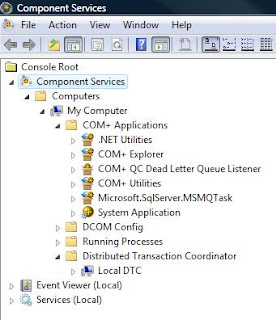
This will open the Component Services menu, select Computers->My Computer and then COM+ or Distributed Transaction Coordinator->Local DTC
Resources:
http://technet2.microsoft.com/windowsserver2008/en/library/1f6d0a27-533b-4516-8656-b492f1649e9f1033.mspx?mfr=true
Enable MS DTC on Windows Vista

You can easily open it from the Search bar:
Type "comexp.msc" or "dcomcnfg" into the search bar.

This will open the Component Services menu, select Computers->My Computer and then COM+ or Distributed Transaction Coordinator->Local DTC
Resources:
http://technet2.microsoft.com/windowsserver2008/en/library/1f6d0a27-533b-4516-8656-b492f1649e9f1033.mspx?mfr=true
Enable MS DTC on Windows Vista
Subscribe to:
Posts (Atom)

 Posts
Posts


